Quick Answer
Founder-generated content (FGC) is short, UGC-style video filmed by the person who runs the brand instead of a paid creator. For a product brand, the fastest version is: pick 6–8 hook formats that already work in your niche, film 20–30 five-second takes in one hour on your phone, cut them into 9:16 videos, then let AI write a different caption for each and schedule 1–2 a day. Keep the hooks that win, brief creators on those, and use AI UGC (faceless product shots generated from your photos) to fill the gaps, never to pose as a customer.
What Is Founder-Generated Content (FGC)?
FGC is UGC-style video (handheld, vertical, talking to the camera or showing the product in use) made by the founder or team rather than by customers or hired creators. The term spread in 2026 among app and e-commerce founders who found that filming their own short videos let them test hooks daily, for free, before spending on creators.
It works for product brands for three reasons:
- You know the product better than any creator. The "I made this because…" story only the founder can tell.
- Speed. A creator brief, shipping a sample and waiting for edits takes weeks. You can film tonight.
- Learning. Ten FGC videos tell you which hook works. Then a creator brief is a copy of a proven video, not a guess.
FGC vs Creator UGC vs AI UGC
| FGC (you film) | Creator UGC (you pay) | AI UGC (you generate) | |
|---|---|---|---|
| Cost per video | Your time | Typically a fee per video plus product | AI credits per second of video |
| Time to first video | Today | 1–3 weeks | Minutes |
| Trust | High: a real founder | High: a real person | Lower; best when faceless |
| Best for | Testing hooks, story, behind the scenes | Scaling a proven hook to new faces | Product motion, unboxing hands, B-roll, filling gaps |
| Watch out for | Burnout; posting too much on one account | Briefs without a proven hook | Posing as a real customer; disclosure rules |
The order that works: FGC first to find the hook, AI UGC for product-only shots and volume, creators last to scale what already won.
Step 1: Find Formats That Already Work (Prompts 1–2)
Don't invent formats. Copy the structure of short videos that already did well in your category, and change everything else. Autoadify's AI Manager can search the web for you; you'll still want to scroll TikTok and Reels yourself for 20 minutes with plain search terms ("best [product] for", "[problem] fix", "small business packing orders").
Prompt 1: Research hook formats
Search the web for short-form videos (TikTok, Reels, Shorts) from small brands that sell [PRODUCT CATEGORY] that did unusually well this year. I want the formats, not the brands: what happens in the first 2 seconds, what's on screen, whether the founder is on camera, and how long the video is. Group them into 6–8 hook formats, with one example link for each where you can find one. Tell me which sources you used.
Prompt 2: Mine the comments
Here are the top comments from 5 videos in my niche: [PASTE]. Which questions, doubts and objections come up most? Turn the top 5 into video ideas where I answer the question on camera with the product in hand.
Comment questions are the best hooks you'll find: they're objections real buyers already have.
Hook Formats That Work for Products
| Format | First 2 seconds | Example line on screen |
|---|---|---|
| The problem | You, mid-frustration, with the old way | "I was so tired of [problem] I made my own" |
| POV: the customer | Product in hands, first-person view | "POV: you finally found a [product] that [benefit]" |
| Packing orders | Hands packing an order, slightly sped up | "Packing orders for my small business" |
| Answering a comment | Screenshot of the comment, then you | "Replying to @…: does it really [claim]?" |
| Before / after | The "before" shot, then a match cut | "Same [room/outfit/skin], 10 seconds apart" |
| Behind the product | Raw material, workshop or sample | "How [product] is actually made" |
| The test | You doing something harsh to the product | "Testing if our [product] survives [test]" |
| Restock / sold out | Empty shelf or a box of new stock | "This sold out 3 times. It's back." |
Only use the "test" and "sold out" formats if they're true. A faked durability test or invented sell-out is the kind of claim platforms and customers punish.
Step 2: Write the Shoot List (Prompts 3–4)
Prompt 3: Rewrite the hooks for your product
Using these hook formats: [PASTE FROM PROMPT 1], write 10 hooks for [PRODUCT] for [WHO BUYS IT]. Each needs: the on-screen text (under 8 words), what I'm doing in the first 2 seconds, and the payoff shot. Every hook must be different. No claims I can't prove; flag any that need proof.
Prompt 4: Turn hooks into a shoot list
Turn these 10 hooks into a shoot list I can film in one hour at [HOME / WORKSHOP / STORE]. Group shots by location so I don't move back and forth. For each shot: what to film, framing (face, hands, product close-up), 5–6 seconds, 3 takes. Add 5 generic B-roll shots (packing, product details, hands using it) I can reuse across videos.
Step 3: Film for One Hour
- Vertical, 9:16, 1080p, 30fps. The phone's default video mode is fine.
- 5–6 seconds per take, 3 takes per shot. You'll use 1.5–3 seconds of each.
- Window light, facing the window. No ring light needed.
- No text or music while filming. Add them in the edit so you can reuse the take.
- Keep the subject in the middle. The top and bottom of a TikTok or Reel are covered by the app's buttons and caption. See image and video sizes.
- Check the background. Addresses on parcels, customer names on order slips and screens are easy to miss.
Step 4: Edit, Then Upload to One Library
Cut each video in your phone editor (CapCut, Instagram Edits or TikTok's own): hook take + payoff take + one B-roll, 7–15 seconds, on-screen text from Prompt 3, a sound from the platform's library. Then upload the finished videos to your Autoadify media library so captions and scheduling happen in one place, not in four apps.
Autoadify won't cut your clips into a sequence for you; its video edit restyles or changes what's in a clip, and doesn't trim or add music. Keep that step on your phone.
Step 5: Captions and Scheduling (Prompts 5–7)
Prompt 5: A different caption for every video (in AI Manager)
I've uploaded 12 new videos for [PRODUCT] to my library today. Write captions for all of them in one go so no two start the same way. For each: TikTok (one-line hook, a real question at the end, 3–5 specific hashtags), Instagram Reels (2–3 lines, the brand name once, max one emoji), and a YouTube Shorts title under 60 characters. Use my brand voice.
Asking for the whole set in one request matters: when an AI writes each caption separately, they tend to open the same way. For why, see why AI content sounds the same.
Prompt 6: Plan two weeks of posts
Schedule these 12 videos over the next 2 weeks: one a day on TikTok at 7pm and Reels at 8pm, Shorts every other day. Put the strongest hooks on Tuesday to Thursday. Don't post the same video on the same day on two platforms. Show me the plan before scheduling.
AI Manager builds a content plan and stops at an approval card; nothing is scheduled until you click Schedule. More: plan a month of posts with AI.
Prompt 7: Pin a comment that sells
For each video, write a first comment I can pin: answer the most likely question (price, size, shipping) in one line, then the product link. No hype words.
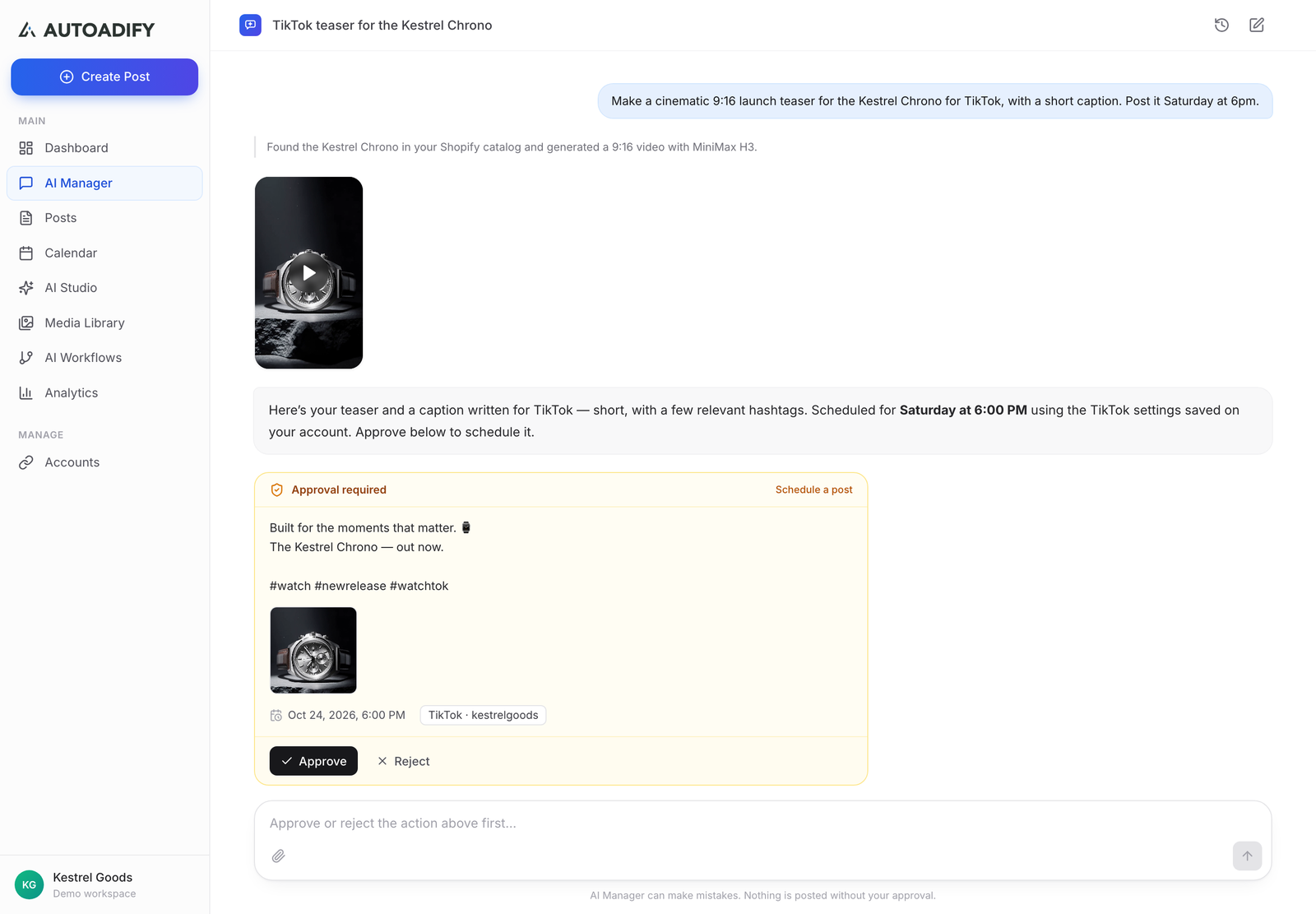
Step 6: Add AI UGC Where Filming Is Hard (Prompts 8–10)
Some shots are a pain to film: the product in a setting you don't have, slow-motion details, the same product in 5 colours. That's where AI video helps, as long as it shows the product, not a fake customer.
Prompt 8: Faceless unboxing from product photos (AI Studio storyboard)
Shot 1: First-person view, two hands open the box and lift out [PRODUCT], natural daylight, slight handheld shake. Shot 2: POV, [PRODUCT] in use at [PLACE], slow and close. Shot 3: Close-up of [DETAIL], light catches the surface.
Add three product photos to an AI Studio storyboard (up to five frames), one prompt per frame, 9:16, and generate with a video model that adds sound, such as Veo 3.1 Fast. The clips are joined into one video. The full method is in faceless AI UGC video ads.
Prompt 9: Extend your own FGC with your own photo
Animate this photo of me holding [PRODUCT]: I turn the product toward the camera and smile, 5 seconds, 9:16, natural light, no other changes.
Use only photos of yourself or of people who've agreed to it. Many video models refuse photos of real people; in Autoadify, Kling 3.0 Pro and Veo 3.1 Fast accept them.
Prompt 10: A voiceover for a product-only clip
Write a 12-second voiceover for this unboxing clip, in my voice: casual, one benefit, one detail only a maker would know, ends with "link's in my bio." Then generate it as audio.
AI Manager writes the script and generates the audio; combine it with the clip in your phone editor.
Disclosure: label realistic AI video the way each platform asks, and never present a generated person as a real customer. See AI disclosure rules for social media.
Step 7: Rate, Repeat, Then Brief Creators (Prompts 11–12)
Prompt 11: What won (in AI Manager, after two weeks)
Look at the videos I posted in the last 14 days on TikTok, Instagram and YouTube. Rank them by engagement. Which hook formats are in the top 3 and which are in the bottom 3? For the top 2, suggest 3 variations each: same format, new first line, new setting.
Film the variations next session and stop filming the bottom formats. That's the whole loop: test, keep what works, drop the rest.
Prompt 12: Turn a winner into a creator brief
Write a one-page creator brief based on our best video: [LINK]. Include the hook word for word, the shot order with timings, what must be visible (product, packaging, link), what to avoid, the claims they may and may not make, and the deliverables (3 versions, 9:16, raw files, no music).
Now you're paying a creator to repeat a format you've already tested on your own account.
How Often Should You Post FGC?
Start at one video a day per account. On a new account, post 1–2 a day, a few hours apart, rather than batches of five; posting the same video to the same account twice, or bulk-uploading near-identical clips, is what tends to get reach throttled. Post each video once per platform and change the first line when you reuse a format. For how each platform ranks short video, see TikTok's algorithm in 2026 and Instagram's algorithm.
Ready to try it on your products? Start with Autoadify, upload your first batch of videos and paste Prompt 5 into AI Manager.
Honest Limits
- The filming is still you. AI writes the shoot list and the captions; it doesn't stand in front of the camera.
- No timeline editor. Cutting takes into a video happens in your phone editor. AI Studio storyboards stitch AI clips, not your footage.
- Web research isn't a TikTok scraper. Prompt 1 finds formats written about on the web; it won't pull view counts from TikTok.
- AI UGC is not a review. It's product footage. Don't caption it as a customer's experience.
Frequently Asked Questions
What does FGC stand for?
Founder-generated content: UGC-style short videos filmed by the founder or team of a brand instead of by customers or paid creators.
Is FGC better than UGC?
For testing, yes: it's free and fast, so you can find a working hook in days. For scale, creator UGC brings new faces and audiences. Most brands should use FGC to find the hook and creators to scale it.
What is AI UGC?
Short videos in a UGC style generated with AI video models, usually from product photos. It works best faceless (hands, unboxing, product close-ups) and should never be presented as a real customer's review.
How many videos can I make from one hour of filming?
Around 20–30 usable takes, which cut into 10–15 finished videos once each video combines a hook take, a payoff take and some B-roll.
Do I have to show my face?
No. Hands, packing and product-in-use shots work well, and several hook formats above are faceless. Showing your face does help with the "I made this" story.
Can Autoadify post my videos to TikTok, Reels and Shorts at once?
Yes. Upload the video once and schedule it to TikTok, Instagram, Facebook, YouTube and the other connected networks, each with its own caption, from the composer or AI Manager.
Which Autoadify plan do I need?
Captions and scheduling work on every plan. AI video models such as Veo 3.1 Fast start on Solo ($19/mo); Pro ($29/mo) suits a brand posting video daily. See pricing.
The Bottom Line
Film an hour of short takes, let AI write a different caption for every video and plan the schedule, keep the hooks that win, then brief creators on proven formats. Use AI UGC for product shots you can't easily film, never as a fake customer. Try it with your products.
Ready to automate your social media?
Autoadify gives you access to 90+ AI models, auto-scheduling across 10+ platforms, Shopify sync, and AI agents — all in one platform.
Start free