Quick Answer
Tell Autoadify's AI Manager your goal, pillars and posting frequency. It proposes a plan of up to 30 posts with dates and image ideas. Approve it, and it writes and illustrates every post in the background, then holds them for your review before you schedule the month. Unlimited on Solo ($19/mo).
AI Manager Content Plans at a Glance
| Feature | AI Manager (Autoadify's in-app AI agent) content plans |
|---|---|
| Plan size | Up to 30 posts per plan, each with a date, networks, copy and an optional image |
| Reads | Your brand context, connected accounts, existing schedule, media library and store catalog |
| Approval | Twice: you approve the plan, then review the finished posts before scheduling |
| Networks | Instagram, Facebook, TikTok, LinkedIn, X, Threads, YouTube, Bluesky, Reddit |
| Plan | Solo ($19/mo) and above for unlimited AI Manager conversations. See pricing |
Why Most AI Content Calendars Stop Too Early
Ask a chatbot for a content calendar and you get a table: "Mon: behind the scenes. Tue: customer tip." Useful for about ten minutes. The work is still all yours: write thirty posts, make thirty images, schedule thirty times across four networks. That last mile is where a month of content takes a week.
AI Manager is connected to the parts that do that work: your accounts, your media library, your store and the scheduler. So the output of the conversation is posts, not a plan for posts.
Plan the Month: Four Messages
1. Give it the month
Plan December for us. Goal: holiday sales without discounting more than 15%. Pillars: gift guides from our catalog, how the product is made, customer photos, and one post a week that isn't selling anything. Instagram 5 a week, LinkedIn 2, Threads 3. Use our brand voice.
AI Manager reads your brand context (voice, audience, words to avoid, which you set once in Settings → AI context), checks which accounts are connected and what's already scheduled, and pulls products from your store for the gift guides.
2. Review the plan, not the posts
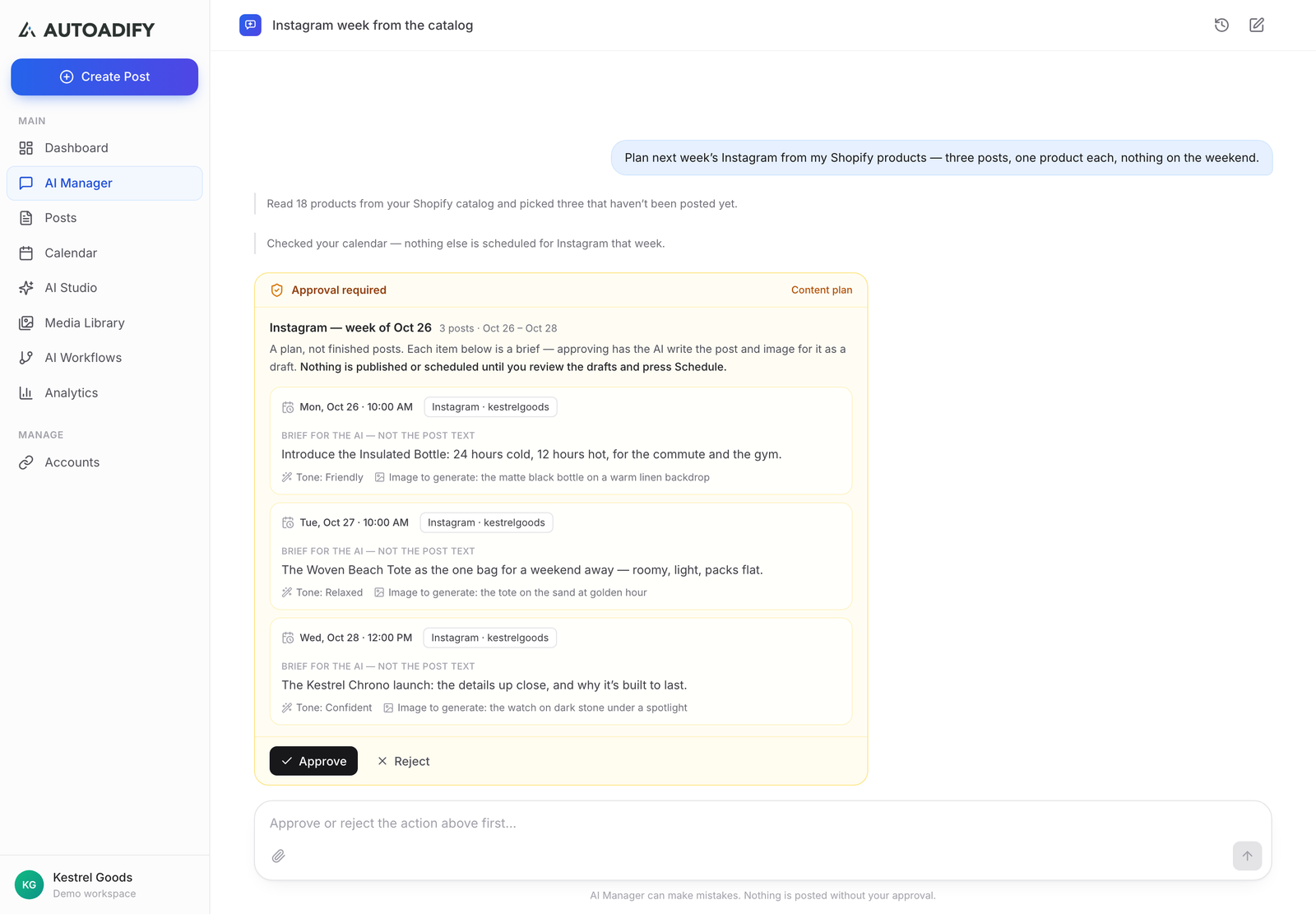
It replies with the plan: each post's date, network, brief and image idea, behind an Approval required card. This is the cheapest place to fix the month. Push back in plain words:
Move the gift guides earlier, nothing product-heavy after the 20th. Swap two of the "how it's made" posts for short customer stories. Keep LinkedIn to B2B gifting.
3. Approve, and let it build
Approve the plan and it runs as a background job: for each post it writes the copy per network and generates the image. A live card in the chat shows progress post by post. You can close the tab; the job keeps going.
4. Read, edit, schedule
Finished posts wait for review. Read them in the chat or on the Posts page, edit anything, then press Schedule to put the month on the calendar. If one item fails (an image the model couldn't make, say), the rest still complete and that one is marked so you can retry it.
Which plan fits: a month of 30 posts with an AI image each uses well under half of Solo's monthly credits. On Free, AI Manager is capped at 3 short conversations, which is enough to try a week, not to run a month.
Plan next month in one conversation: connect your accounts, set your brand context, and ask for the month. Start with Autoadify.
Where to Keep a Human
- The plan. A wrong angle in the plan becomes thirty wrong posts. Spend your time on step 2.
- Dates that matter. AI Manager knows the calendar, not your shipping cut-off or your sale end date. Tell it.
- Product claims. It writes from your product data. Check any claim about materials, sizing or results.
- Publishing. AI Manager never schedules or publishes without your approval. That's by design; see can AI agents post without approval?
Frequently Asked Questions
How many posts can one plan hold?
Up to 30. For more, run a second plan for the second half of the month.
Can I use my own photos instead of AI images?
Yes. Tell it to use photos from your media library; it can search the library by what each photo shows.
Does it write different copy per network?
Yes. Each network in a post gets its own version, fitted to its length and format.
Can it post videos?
Yes, if you ask for them. Video uses far more credits than images, so a month of daily video is a Team-sized budget.
What if I don't have a store?
It works the same without one. The store only feeds product posts.
Can I do this from ChatGPT or Claude instead?
Yes, through the Autoadify MCP server on Pro and above; see running a week from Claude.
The Bottom Line
A content calendar is only useful when it turns into scheduled posts. AI Manager takes one message, proposes a month you can argue with, then writes, illustrates and lines up every post for your approval. See what else it does on the AI Manager page. Plan your next month.
Ready to automate your social media?
Autoadify gives you access to 90+ AI models, auto-scheduling across 10+ platforms, Shopify sync, and AI agents — all in one platform.
Start free