You have hundreds of good photos you have never posted.
The product shoot from spring. The behind-the-scenes shots from the workshop. The event you meant to share and didn't.
They are not unposted because they are bad. They are unposted because every post needs a decision — which photo, what to say, when — and that decision is the one that never gets made on a busy week.
This is how to take the decision out of it.
The short version: a social media AI workflow that, on a schedule you set, picks a random photo you uploaded and have never posted, looks at it, writes a caption about what is actually in it, and publishes it. When you run out of photos, it stops and tells you. It never recycles one.
1. The problem isn't content. It's the decision.
Most accounts don't go quiet because they run out of things to post.
They go quiet because they run out of decisions.
Picture a café with 300 photos on a shared drive and an Instagram account that posts twice a month. The photos exist. The time to choose one, write something and post it does not.
Scheduling tools don't fix this. A scheduler still needs you to pick the photo and write the caption — it only moves the moment you press the button. The decision is still yours, every single time.
So the fix is not a better calendar. It is removing the choice.
2. Let randomness pick
When you choose photos yourself, you pick your favourites. The same five shots go out. The other 295 never get a turn.
Your audience has seen none of them. To your followers, every unposted photo is new.
A random pick gives every photo an equal chance. Over a few months, your whole library gets posted — not just the shots you happened to remember.
The pool matters as much as the pick. In Autoadify, the From your library step only draws from files you uploaded yourself. It never picks:
- Images you made in the AI Studio — an experiment you abandoned should not go out unattended
- Stock images, Canva designs or product photos a workflow downloaded on its own
- Anything you deleted
Nothing goes out that you didn't put there on purpose.
3. "Never posted" has to mean never
Here is the part most automation gets wrong.
A tool that re-posts your photo when it runs out isn't automation. It's a rerun.
The step counts a photo as posted when it is attached to a post that is published, being published, or scheduled. Drafts and failed posts do not count — that photo never reached anyone, so it stays in the pool.
But that creates its own trap. If you run the workflow in draft mode to test it, the photo stays unposted — and the next run could serve you the same one.
So the step also remembers its own picks. A test run in draft mode won't hand you the same photo on the next run.
4. The caption has to be about the photo
Your photos are called IMG_4821.jpg. That tells a caption writer nothing.
So most automated captions end up generic: "Check out our amazing products! ✨" — under a photo of a latte on a window ledge.
Autoadify looks at every upload with a vision model and stores a plain description of what it shows. When the workflow picks a photo, the caption step is told what is in it — and told not to describe anything the photo doesn't show.
The same latte gets a caption about the latte, the fern in the foam and the morning light, not about "our products".
You write the caption instructions once, in the step: tone, length, a call to action, whether to add hashtags. You also choose the model that writes it from 80+ AI models.
5. When it runs out, it stops — loudly
Every library runs out eventually. What happens next is the real test of the tool.
Silence is the worst way for an automated account to fail. You find out three weeks later, when someone asks why you stopped posting.
When there are no unposted photos left, the run fails with a plain message: upload more, and the workflow will pick them up on its next run. Then:
- You get one alert, in the app and by email — once per problem, not once per run, so a daily workflow doesn't flood your inbox.
- After three failed runs in a row, the workflow pauses itself instead of failing quietly forever.
- Any AI credits spent on a run that fails before publishing are refunded.
Top up the library, resume the workflow, and it carries on.
6. Set it up in five minutes
- Upload your photos to your Library. Only files you upload yourself are ever picked.
- Add a schedule trigger — daily, weekly on the days you choose, every two weeks, or monthly, at a set time in your timezone.
- Add From your library and choose Photos, Videos or Either.
- Add Write caption, and optionally Add hashtags.
- Add Publish, choose your accounts and when to post — immediately, after a delay, at a fixed time, or saved as a draft for you to review — then activate it.
Start with Save as draft for the first week if you want to see what it picks before anything goes public. Switch to publishing once you trust it.
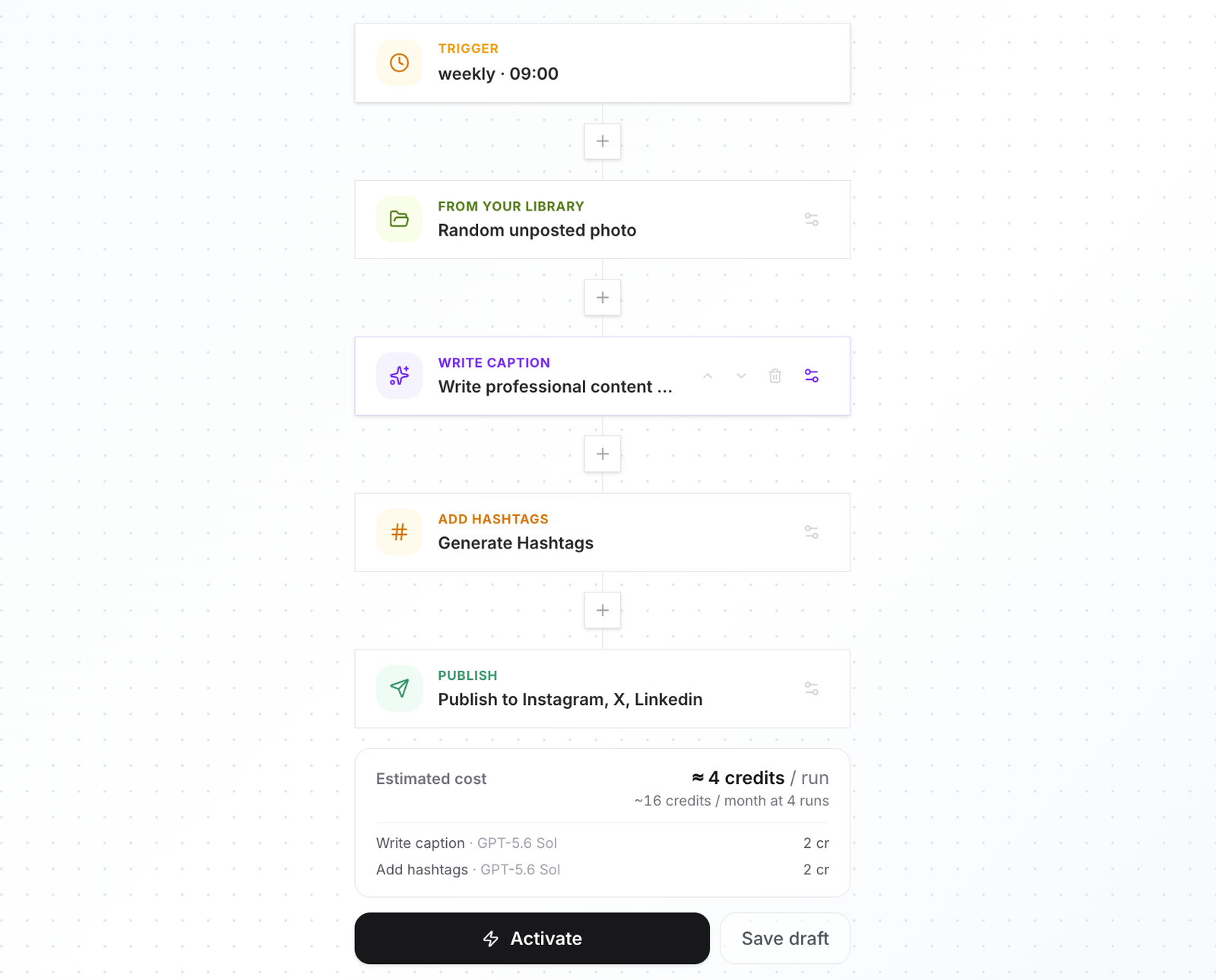
Why this is a workflow, not an agent
This runs unattended, so it belongs in a workflow. You decide everything — the pool, the schedule, the caption rules, the accounts — before it ever runs.
The AI agent is the other half: you ask in chat, it drafts, and it stops for your approval before anything is scheduled or published. AI agent vs AI workflow covers when to use which.
The recap
- Accounts go quiet from too many decisions, not too little content.
- Let a random pick choose, from photos you uploaded yourself.
- "Never posted" has to really mean never — no reruns when the pool runs dry.
- The caption should describe the photo, not your brand in general.
- When it runs out, it should tell you and pause, not go silent.
Your library is already a content calendar. It just needs something to work through it.
See it work
Upload your photos, add a schedule, and let the workflow post them one by one. Start free.
Ready to automate your social media?
Autoadify gives you access to 80+ AI models, auto-scheduling across 10+ platforms, Shopify sync, and AI agents — all in one platform.
Start free